Daily reports list
The Daily Reports list is the reports for the project that is currently selected.
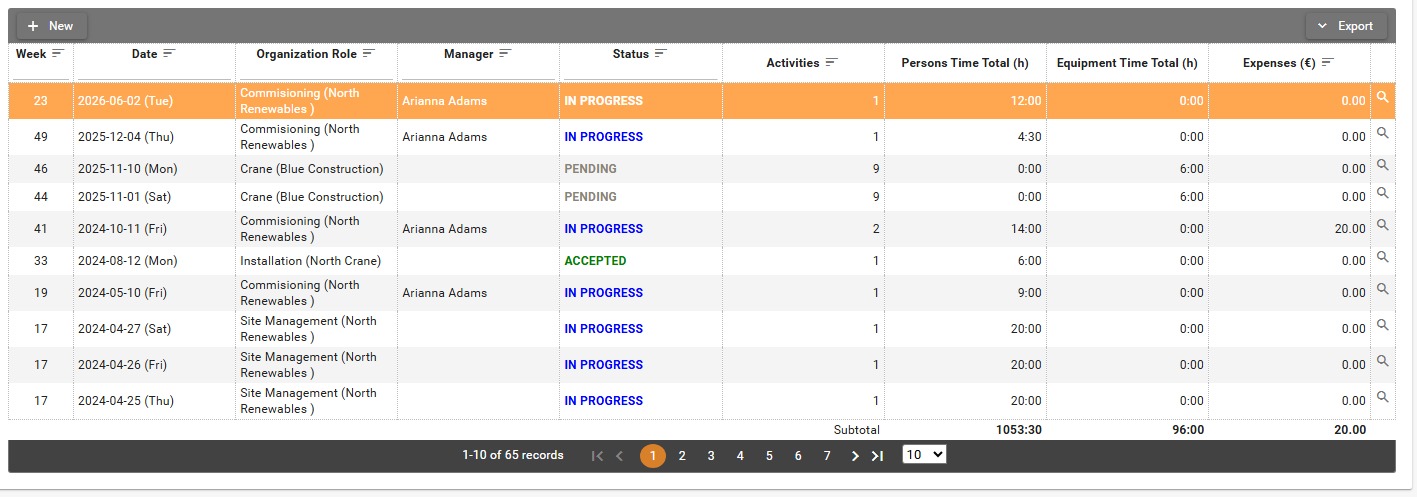
The table has one Status column. The date includes the weekday. Organization Role can include the organization name in parentheses, for example Commisioning (North Renewables).
The columns are Week, Date, Organization Role, Manager, Status, Activities, Persons Time Total (h), Equipment Time Total (h), and Expenses (€). The footer is Subtotal for the person hours, the equipment hours, and the expenses.
A closed project can still be reviewed. No new daily report can be created while it is closed.
More than one organization project role can mean more than one report on the same day. Billing still counts that as one reporting day. People must be on the project before they can create a report. See Users and persons in project and Billing.
Actions
- Click New to open Create New Daily Report. Choose Organization Role first. Date stays unavailable until a role is chosen.
- Click View to open the report.
- Open Export, then Export to Excel, to download the table.
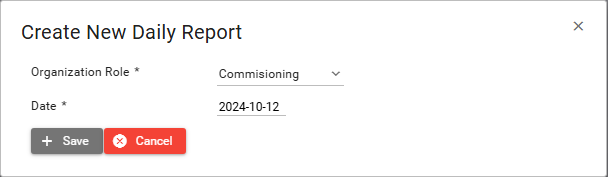
Save and Cancel are on the dialog. Cancel closes it without creating a report.
The roles in Organization Role are the organization project roles assigned to you. On the project used for this guide they were Commisioning, Site Management, and Supervision.